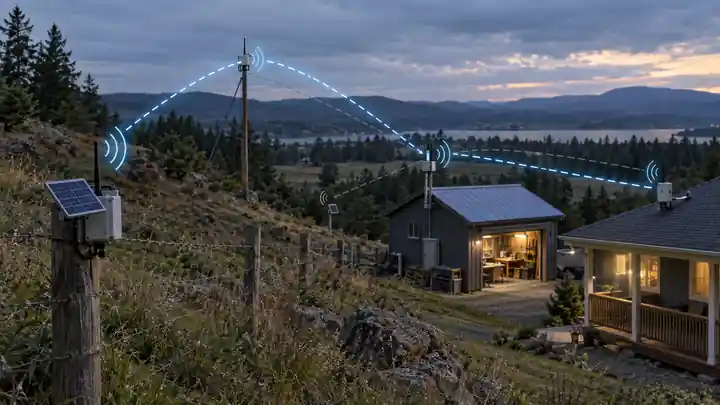
I use LoRa for a few different projects, but most of my sensor builds are actually very simple from a networking point of view: a remote node sends a small packet and a gateway receives it.
Mesh networking is what you start looking at when that direct link is no longer enough.
Maybe the far end of a property sits behind a hill. Maybe two handheld radios can each reach a repeater on a rooftop, but not each other. In those cases, another LoRa node can sit in the middle and pass the packet on.
That is the basic idea behind LoRa mesh networking: instead of every device needing a direct path to its destination, messages can move through one or more intermediate nodes.
One thing worth clearing up straight away is that LoRa itself does not create the mesh. LoRa is the radio link. The routing, relaying, hop limits and all the other mesh behaviour come from the software running on top of it.
What Is LoRa Mesh Networking?
At its simplest, two LoRa radios can talk directly to each other. If that link is reliable, there is no reason to involve any other nodes.
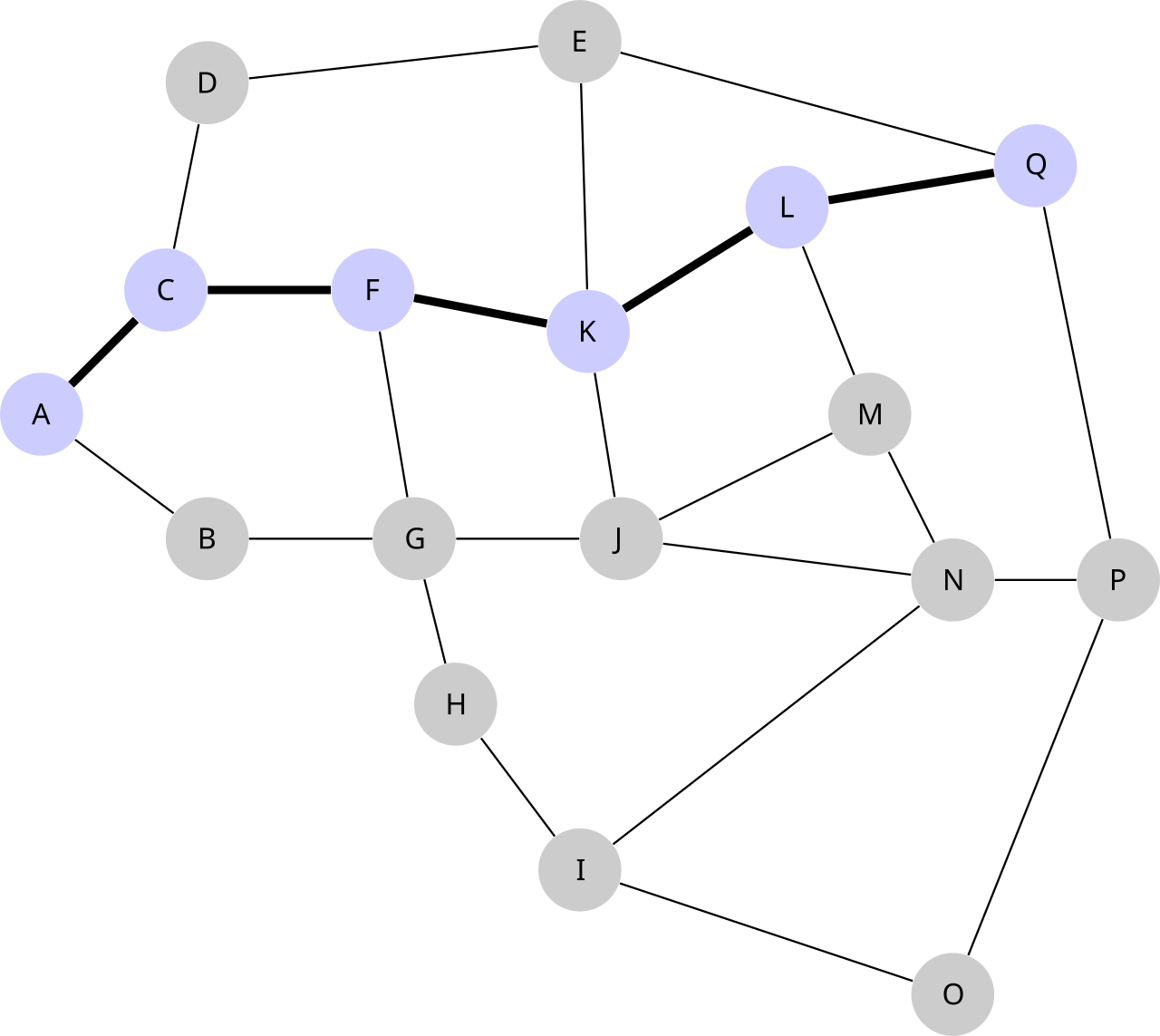
A mesh becomes useful when the destination cannot be reached directly. Another node can receive the packet and pass it on, with additional relays doing the same thing if the message needs to travel farther.
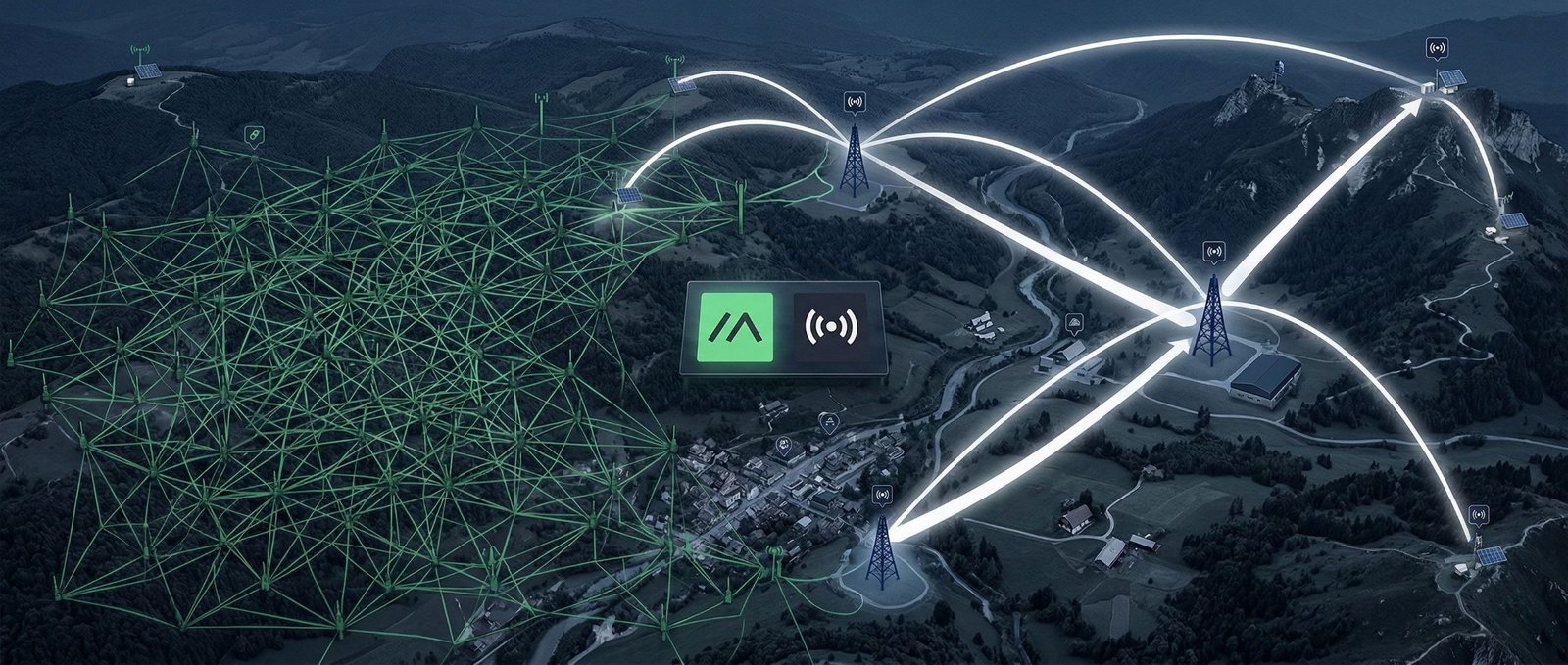
The diagram below shows the idea more clearly. The highlighted route is only one possible path through the network, and another path could be used if one of those links was unavailable.
This is what platforms such as MeshCore and Meshtastic are doing, although they do not handle forwarding in exactly the same way.
LoRa Is Not Automatically a Mesh
It is an easy distinction to miss because the word LoRa gets used to describe everything from a pair of radios to a full LoRaWAN deployment.
The easiest way to think about it is that LoRa is just the radio technology. What you build on top of that is up to you.
- Point-to-point LoRa: one radio sends directly to another.
- Gateway or star network: several remote devices all talk to one central gateway.
- LoRa mesh: some nodes can forward traffic for other nodes.
- LoRaWAN: a standard network stack using LoRa radios, gateways and a network server.
My secure LoRa gateway for Home Assistant is a good example. It uses LoRa, but it is not a mesh. Each sensor talks straight back to the gateway because, for that job, there is no reason to make the network more complicated than it needs to be.
How a Packet Moves Through a LoRa Mesh
The details depend on the platform, but the basic job is always pretty similar.
A node sends a packet
The useful data is wrapped up with whatever extra information the mesh needs. That may include the source, destination, packet ID, hop limit or some kind of route information.
Nearby nodes hear it
LoRa is radio, so more than one nearby device may physically receive the same transmission. The software then decides what to do with it.
A relay may send it again
If the packet still needs to travel farther, an eligible node retransmits it. That is another hop.
Eventually it reaches the destination
The receiving device can then process the message and, depending on the protocol, send an acknowledgement or reply back through the network.
The bit I would keep in mind is that a mesh does not magically increase the range of one radio. It builds a longer path out of several separate radio links.
Flooding vs Route-Based Forwarding
This is where mesh networking gets more interesting, because blindly repeating every packet is a good way to make a busy LoRa channel even busier.
Flooding
With flooding, eligible nodes repeat a packet and allow it to spread through the mesh. Packet IDs and hop limits stop the same message bouncing around forever.
The nice part is that the sender does not always need to know the route in advance. If there are several possible paths through the network, the packet has a decent chance of finding one.
The downside is obvious once the mesh gets busy: every extra retransmission takes airtime.
Known or learned paths
Another approach is to learn a working route and reuse it for later packets. Instead of a large group of nodes getting involved every time, only the relays on that path need to forward the message.
That is more efficient, but it also means the system needs some way to recover when a repeater disappears or a once-good radio path stops working.
Real platforms can mix both ideas. MeshCore, for example, can use flooding to discover a direct-message path and then reuse the learned path afterward. I go into that in much more detail in my MeshCore guide.
LoRa Mesh vs LoRaWAN
LoRa mesh and LoRaWAN both use LoRa radios, but I would not treat them as variations of the same network design.
| Network type | How traffic normally moves | Where it makes sense |
|---|---|---|
| Point-to-point LoRa | Directly between two radios | Simple links and custom projects |
| LoRa gateway / star network | Remote devices talk directly to one gateway | Private sensor networks with good gateway coverage |
| LoRa mesh | Packets can pass through other radio nodes | Areas where direct links are not always possible |
| LoRaWAN | End devices transmit to gateways, which pass data to a network server | Standardised LPWAN and larger sensor deployments |
According to the LoRa Alliance, LoRaWAN uses a star-of-stars layout. End devices send their data to gateways; those gateways pass it on to a network server. The end devices are not normally acting as repeaters for each other.

For battery sensors, that can be a very good thing. If the sensor can reach the gateway directly, it can wake up, transmit, and go back to sleep without worrying about anyone else’s traffic.
That is exactly how my LoRa water tank sensor works. It does not need a mesh because the direct link already solves the problem.
When a LoRa Mesh Is Actually Useful
I would not build a mesh just because the hardware supports it. I would use one when there is a real coverage problem to solve.
- Large or awkward properties: a relay on a shed, hill or mast may bridge an area that cannot see the main gateway.
- Off-grid messaging: devices can move messages without relying on cellular coverage or internet access.
- Community networks: well-placed fixed repeaters can join areas that handheld nodes could not cover by themselves.
- Remote monitoring: a powered relay can bridge a difficult radio path for a sensor or remote device.
- Backup paths: some mesh systems can recover through another route if a preferred relay drops out.
For me, that is the real appeal of mesh. It is less about chasing an impressive range number and more about being able to put a relay somewhere that has a much better radio view of both sides.
Where LoRa Mesh Starts to Hurt
There is a tendency to assume that if one repeater helps, ten repeaters must be better. That is not necessarily true with LoRa.
- LoRa is slow. It is great for small packets, but it is not a high-bandwidth network.
- Every hop uses airtime. A message crossing three relays has to be transmitted several times.
- Too much flooding causes congestion. A dense mesh can become worse if too many nodes are repeating traffic.
- Extra hops add delay. This usually does not matter for a sensor reading, but it still exists.
- Repeaters need power. A node that has to sit awake listening for traffic is a very different power problem from a sensor that sleeps most of the day.
- Radio regulations still matter. Mesh software does not remove the frequency, power or airtime rules that apply in your region.
A couple of carefully placed repeaters will often do more for a network than a pile of extra nodes sitting in poor RF locations.
What Determines LoRa Mesh Range?
I would be wary of any fixed figure quoted as the range of a LoRa mesh. There are too many variables.
Each hop still lives or dies by the same things as any other LoRa link:
- antenna quality and tuning
- antenna height
- terrain and line of sight
- buildings and vegetation
- frequency and legal transmit power
- bandwidth and spreading factor
- local RF noise
Height is one of the first things I would look at for a fixed repeater. Getting a radio out of a building and into a clear elevated position can make a bigger difference than adding another hop at ground level.
MeshCore and Meshtastic
If you are looking at LoRa mesh from a maker point of view, MeshCore and Meshtastic are probably the two names you will come across most often.
MeshCore
MeshCore is quite deliberate about node roles. Companion devices are the user endpoints and dedicated repeaters handle forwarding. That separation makes repeater placement a deliberate part of the network design instead of turning every portable node into part of the backbone.
If that is the platform you are interested in, my complete MeshCore guide covers the node roles and routing behaviour properly.
Meshtastic
Meshtastic is more phone- and messaging-focused. It has a broad device ecosystem, maps, channels and an easier path into LoRa mesh for someone who mainly wants off-grid communications.
The two platforms overlap, but they are not just different apps doing the same thing. I have a separate MeshCore vs Meshtastic comparison if you are trying to decide between them.
Hardware for a LoRa Mesh Network
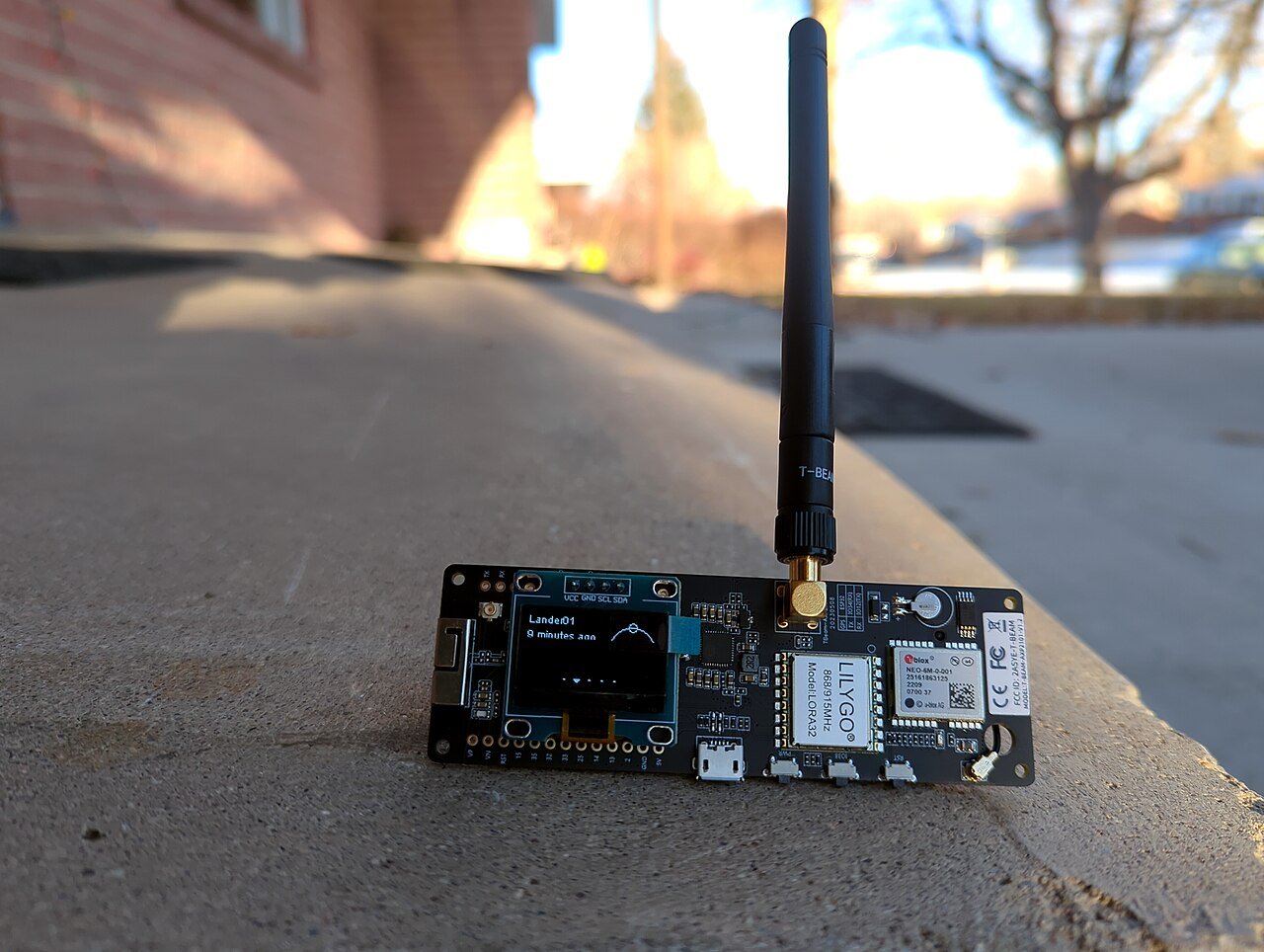
You do not need anything exotic to experiment with this. A node generally just needs a microcontroller and a compatible LoRa transceiver.
There are plenty of boards that put both on the same PCB. Heltec, LilyGO, RAK Wireless and Seeed all have options commonly used for LoRa projects.
ESP32-based boards are handy when you also want Wi-Fi, Bluetooth or enough processing power to run a web interface or other extras. If you are still getting familiar with that side of things, my beginner’s guide to ESP32 is a useful starting point.
For MeshCore, I also keep a separate guide to the best MeshCore devices. A handheld companion and a permanent rooftop repeater have very different requirements, so I would choose the hardware around the job rather than the other way around.
One board I use a lot for LoRa work is the Heltec WiFi LoRa 32 V4. It gives you an ESP32-S3, SX1262 radio and display in one small board, which makes it an easy platform to experiment with.
What About Sensors and Home Assistant?
This is where I would resist the temptation to use mesh for everything.
If a sensor already has a reliable path to a powered gateway, I would keep it direct. It is easier to troubleshoot and much easier to optimise for battery life.
That is the design I use in both my DIY LoRa gateway and the newer secure LoRa gateway. The remote node handles LoRa. The gateway stays powered, deals with Wi-Fi and MQTT, and passes everything into Home Assistant.
If the sensor sits somewhere the gateway simply cannot reach, then a powered relay in a better position starts to make sense.
Once the packet reaches a gateway or bridge, there is nothing stopping it being fed into Home Assistant. The LoRa topology and the Home Assistant side are really two separate problems.
A Few Things I Would Get Right First
- Use the fewest hops you need. Every hop adds another transmission.
- Spend time on repeater placement. Height and a clear RF path matter more than simply adding nodes.
- Keep packets small. LoRa is at its best with compact, infrequent data.
- Match the radio settings expected by the platform. Frequency, bandwidth, spreading factor and the rest of the modem configuration still matter.
- Do not make every device a repeater unless the protocol is designed for it. More forwarding can mean more collisions.
- Plan power around the node’s role. A sleeping sensor and an always-listening repeater are completely different designs.
- Check the radio rules for your region. The legal frequencies and power limits still apply.
If you are building around MeshCore, my MeshCore repeater flashing guide is a logical next step once you are ready to put a fixed relay on the network.
LoRa Mesh Networking FAQ
Does LoRa automatically create a mesh network?
No. LoRa handles the radio transmission. The mesh behaviour comes from the firmware or protocol running on top of it.
Does a LoRa mesh need the internet?
No. The radio network itself can work completely offline. Some apps may use the internet for extra features, but the actual LoRa links do not need it.
Is LoRa mesh the same as LoRaWAN?
No. LoRaWAN normally has end devices sending to gateways, with the gateways passing data to a network server. The end devices do not normally relay each other’s traffic.
How far can a LoRa mesh reach?
There is no useful single number. The total coverage comes from chaining together individual links, and each of those links depends on antennas, height, terrain, radio settings, interference and legal transmit limits.
Can an ESP32 be used for LoRa mesh networking?
Yes. You can pair an ESP32 with a LoRa transceiver, or use one of the many development boards that already combine both. Whether a particular board works depends on the mesh firmware you want to run.
Final Thoughts
I think LoRa mesh makes the most sense when you treat it as a way to solve awkward radio coverage, not as something every LoRa project automatically needs.
If two devices can already talk directly, keep it simple. If they cannot, a well-positioned relay can be extremely useful. From there, the challenge is making sure the mesh does not waste so much airtime forwarding packets that it creates a new problem of its own.
If you want to turn the theory into a real network, I would start with my MeshCore LoRa mesh guide. If you are still deciding which platform suits you, the MeshCore vs Meshtastic comparison is the better place to go next.