
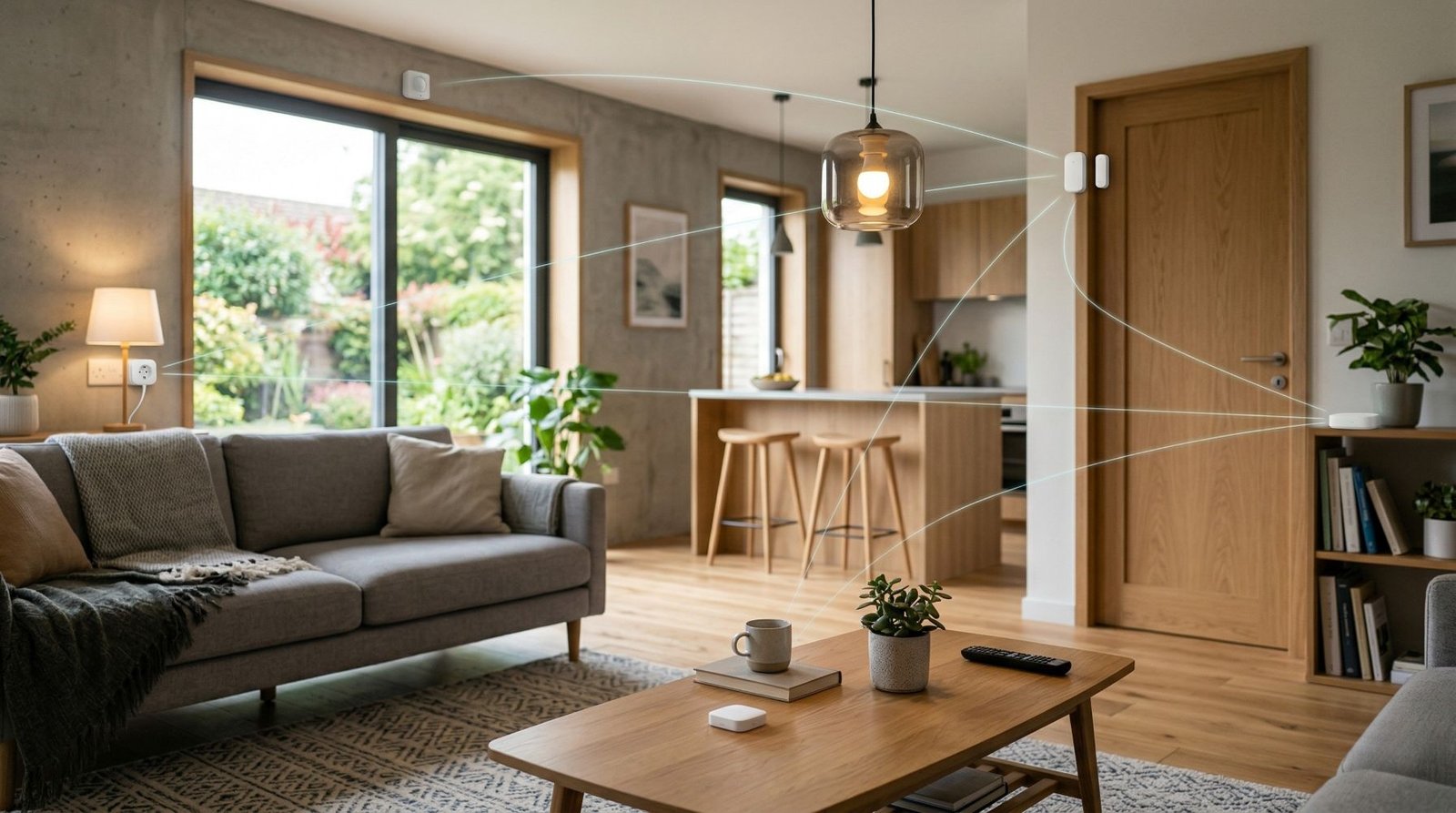
If you are trying to work out what Zigbee is, the simple answer is this: Zigbee is a low-power wireless standard designed for smart home and IoT devices like sensors, plugs, buttons, lights, and motion detectors. It is built around reliable local communication and mesh networking, which is a big reason so many people use it for smart homes.
In a Zigbee smart home, devices do not all need to talk straight back to your Wi-Fi router. Instead, many Zigbee devices can pass messages across the network, which helps extend coverage and improve reliability around the home. Zigbee is also designed for low-power use, which is why it is so common in battery devices like door sensors, buttons, and motion sensors.
For a beginner, that usually means one thing: if you want a smart home with lots of small devices that respond quickly and do not chew through batteries, Zigbee is one of the best places to start. That does not mean it is perfect for everything, but it is easy to see why it has become so popular.
What is Zigbee?
Zigbee is a wireless communication standard used in smart homes and other IoT setups. The Connectivity Standards Alliance describes it as a full-stack, market-proven wireless mesh technology built for reliable and interoperable device communication. In plain English, it is a way for smart home devices from different brands to communicate locally using a shared language and network structure.
You will usually see Zigbee used in products like smart plugs, bulbs, contact sensors, temp sensors, buttons, blinds, and motion sensors. These are exactly the kinds of devices that do not need huge bandwidth, but do need to be dependable and often battery-friendly.
How Zigbee works
At the radio level, Zigbee is based on IEEE 802.15.4. In the common 2.4 GHz band, that runs at 250 kbps, which is a lot lower than Wi-Fi, but that is not a problem for small smart home messages like “door opened”, “motion detected”, or “turn the light on”. Zigbee is built for short control messages, not big data jobs.
The part that makes Zigbee especially useful in a house is the mesh network. A mesh network means devices can help carry messages across the home instead of relying on one direct connection. So if a door sensor at the front of the house cannot easily reach the coordinator, it may still get there through a nearby router such as a smart plug or another always-on device. In practice, that is one of Zigbee’s biggest strengths.
Zigbee is also built for local operation. The CSA says Zigbee’s local connectivity can keep working even if the internet is down, because the network itself does not depend on the cloud to pass messages around the home. That is a big plus if you care about responsiveness and reliability.
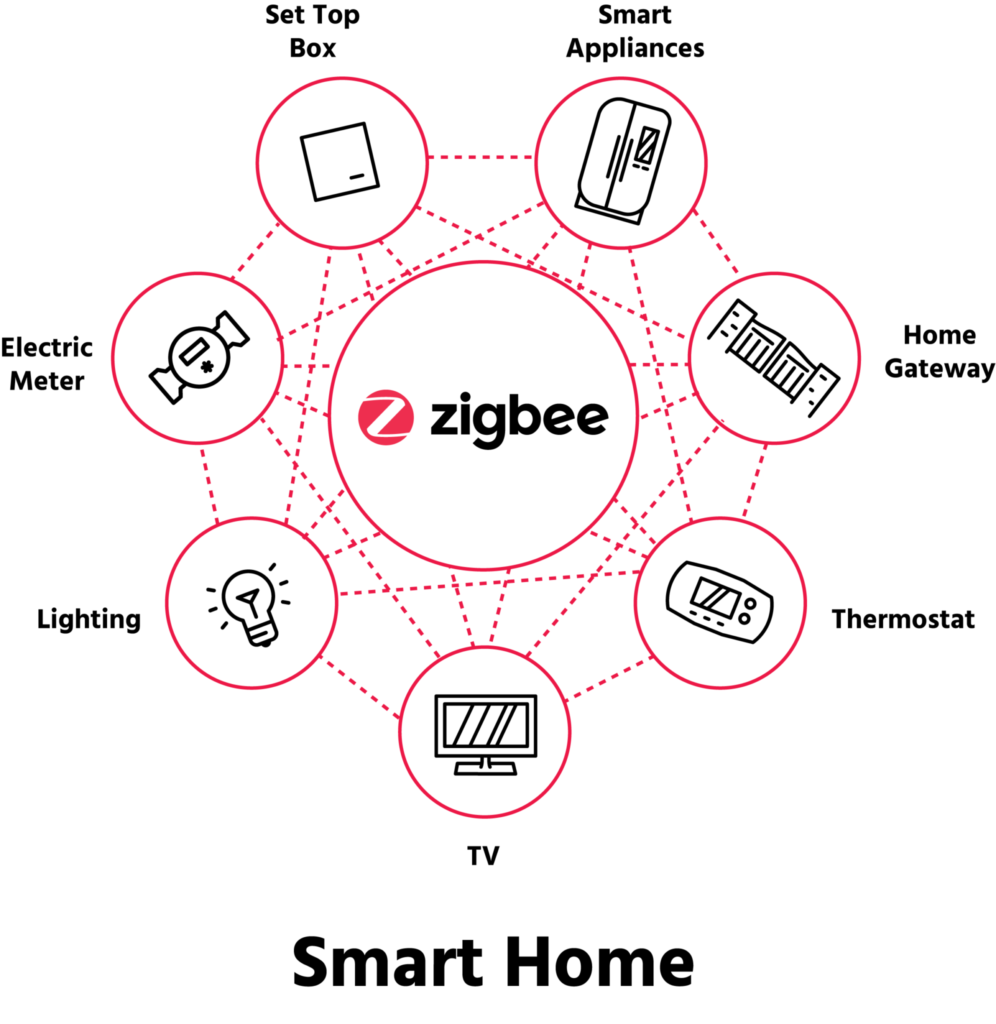
What is a Zigbee coordinator, router, and end device?
This part sounds more technical than it really is.
Zigbee coordinator
Every Zigbee network has one coordinator. Its job is to form the network, choose the channel, assign the network details, and often handle security duties as the trust center. After that, it also behaves like a router. In a normal home setup, this is usually your hub, gateway, or USB Zigbee dongle.
Zigbee router
A router is a Zigbee device that can pass messages along for other devices. Routers are not meant to sleep, so they should stay powered on while the network is running. This is what helps build out the mesh and improve range through the house.
Zigbee end device
An end device is the leaf node. It talks through a parent device and does not relay traffic for other devices. Sleepy end devices can power down their radios when idle, which helps save battery life. That is why battery sensors and buttons are so often end devices.
If I was explaining this as simply as possible, I would put it like this:
- The coordinator starts and manages the network.
- The routers help spread the signal and carry traffic.
- The end devices are usually the battery-powered gear doing the actual sensing or triggering.
Why Zigbee is popular for smart homes
Zigbee became popular because it hits a very practical sweet spot for smart homes. It is designed for low power, supports mesh networking, and has a large ecosystem of certified products. The CSA also points to built-in interoperability, self-healing mesh behaviour, AES-128 encryption, and simple DIY use as core strengths.
That matters in real life. A smart home often has lots of small devices spread around the place. Door sensors, buttons, leak sensors, and motion sensors do not need huge speed, but they do need to respond quickly and stay connected. Zigbee suits that job well.
In my experience, Zigbee starts to make more sense the moment you move beyond a couple of smart bulbs and plugs. Once you want multiple sensors around the house, local control, and better battery life, it usually feels more like a proper smart home system than relying on random Wi-Fi gadgets from different apps.
Pros and cons of Zigbee
Pros
Low power use: Zigbee is designed for low-power and even ultra-low-power applications, which makes it a strong fit for battery devices.
Mesh networking: Zigbee networks can self-heal and reroute traffic, which helps make them more resilient than simple one-hop setups.
Local control: Zigbee communication can keep working locally even if your internet connection drops.
Large device ecosystem: Zigbee has been around a long time and has a broad range of smart home products across major categories.
Cons
You usually need a coordinator or hub: A Zigbee network needs one coordinator to form and manage the network, so it is not usually as direct as buying a Wi-Fi device and connecting it straight to your router.
Channel planning matters: Zigbee commonly shares the 2.4 GHz space with Wi-Fi, so poor channel choices can hurt reliability.
Not every device strengthens the mesh: End devices do not relay messages, so simply adding more battery devices does not automatically improve coverage.
Compatibility can still be a bit messy in practice: Zigbee has strong standards and certification, but real-world smart home setups still depend on the coordinator, platform, and device quirks. This is better than it used to be, but it is still worth checking before you buy.
Zigbee vs Wi-Fi
This is one of the most common smart home questions, and the honest answer is that they suit different jobs.
Wi-Fi devices connect directly to your home network, which is convenient and can mean no extra hub. Wi-Fi is also an IP-based network technology used for higher-throughput applications, and modern low-power Wi-Fi gear does exist. But traditional Wi-Fi was originally built around higher-power, higher-throughput uses, and battery-powered IoT devices can be more challenging from a power point of view.
Zigbee, on the other hand, is built specifically around low-power device communication and mesh networking. That makes it a really good fit for sensors, buttons, contact sensors, and similar smart home gear.
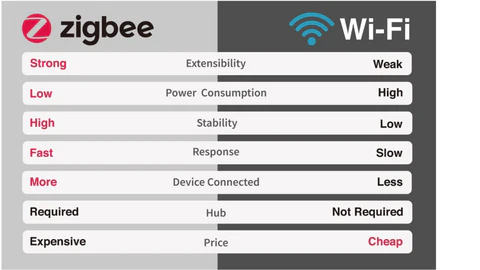
So which is better?
If you only want a few devices and you care most about simple setup, Wi-Fi can be perfectly fine. If you want a house full of small smart devices that work locally and do not burn through batteries, I would usually lean Zigbee.
A simple way to think about it is this:
- Choose Wi-Fi for straightforward direct-to-router devices, especially where bandwidth or native network access matters more.
- Choose Zigbee for low-power smart home devices and larger networks of sensors and controls.
Zigbee vs Bluetooth
Bluetooth matters in smart homes too, but usually in a different way. Bluetooth LE is widely used for setup, short-range communication, and small devices. Bluetooth Mesh is also a real thing, and the Bluetooth SIG says it is built for exchanging small messages in control and automation systems.
That said, for a typical beginner smart home, I would not normally choose plain Bluetooth as the main protocol for sensors all around the house. Zigbee generally makes more sense as a dedicated smart home network.
Zigbee vs Z-Wave
Z-Wave is the other protocol that often comes up in the same conversation as Zigbee.
Like Zigbee, Z-Wave is designed for smart home control, monitoring, and status applications. It also supports mesh networking. One big difference is that Z-Wave operates in the sub-1 GHz band, while Zigbee is commonly used in 2.4 GHz. The Z-Wave Alliance says this helps it avoid interference from Wi-Fi and other 2.4 GHz technologies.
That is a real advantage. On the other hand, Zigbee has historically had a very broad device ecosystem and is deeply embedded in many mainstream smart home products. The CSA also notes Zigbee is used by major ecosystem providers and has a large certified product base.
If I was starting from scratch today, I would look at it like this:
- Zigbee is usually easier to find, easier to mix into common smart home setups, and especially good for sensors, plugs, lights, and buttons.
- Z-Wave is still a strong option, especially if you want sub-1 GHz operation and a protocol built very specifically for home control.
Neither is automatically better in every house. It depends on your devices, your hub, and what is available where you live.
Zigbee vs Matter
This is where a lot of beginner guides get confusing, so let’s keep it simple.
Zigbee and Matter are not the same thing, and they are not really direct replacements. Matter is an application standard that runs over technologies like Wi-Fi, Thread, and Ethernet, with Bluetooth LE commonly used for setup. Matter also supports bridges, which means Zigbee and Z-Wave devices can be brought into a Matter ecosystem through compatible hubs or controllers.
The CSA’s own guidance is basically that Zigbee and Matter will likely co-exist in the same home, and bridging between them is important. Matter also borrows from ideas familiar to Zigbee developers, including parts of the data model.
For beginners, the important takeaway is this:
- Matter is about cross-platform compatibility and a simpler multi-brand smart home experience.
- Zigbee is still its own smart home network technology and is still very relevant.
So no, Matter does not make Zigbee useless. In many homes, they will happily live side by side.
What you need to get started with Zigbee
Getting started with Zigbee is usually pretty simple.
A Zigbee coordinator
You need one coordinator to create the network. In practical terms, that is usually a dedicated hub, a smart home gateway, or a USB Zigbee dongle connected to something like Home Assistant.
A few Zigbee devices
For a first setup, I would keep it simple:
- one or two smart plugs
- a door or window sensor
- a motion sensor
- maybe a button or smart bulb
That gives you a nice mix of always-on devices and battery devices, and it lets you see how the network behaves in real life.
Good placement
Because Zigbee is mesh-based, placement matters. Routers help carry traffic, while sleepy end devices do not. So having a couple of always-on router-capable devices spread through the house can make a big difference.
Sensible channel choices
Zigbee shares 2.4 GHz spectrum with Wi-Fi in many homes, so it is worth thinking about channel overlap from the start. The CSA notes that Zigbee has multiple channels in 2.4 GHz, and Silicon Labs notes that maximizing separation from Wi-Fi improves 802.15.4 performance.
If I was setting up a beginner Zigbee smart home, I would start with the coordinator in a decent central spot, add a couple of reliable always-on devices first, and then build out sensors after that.
Common Zigbee mistakes beginners make
Assuming every device improves the mesh
This is probably the biggest one. End devices do not relay messages, so adding ten battery sensors does not strengthen the network the way adding a few good routers can.
Ignoring channel interference
Zigbee and Wi-Fi often share the same general 2.4 GHz space. If the channel choice is poor, performance can suffer. Zigbee has multiple channels available, and good separation from Wi-Fi helps.
Putting the coordinator in a bad spot
Because the coordinator forms the network and sets the initial channel, bad placement can make the whole setup feel worse than it should. A more central and cleaner RF position is usually better.
Expecting cloud-style setup logic
Zigbee is often at its best when you think of it as a local device network, not just another gadget that talks to an app. That is part of why it can be more reliable when set up well.
Is Zigbee worth it?
For a lot of people, yes.
If your smart home is mainly sensors, plugs, buttons, lights, and automations, Zigbee still makes a lot of sense. It is mature, low-power, local, and built around the kind of devices that make up a practical smart home.
I would say Zigbee is especially worth it if you want:
- lots of battery sensors
- local control
- a more stable setup than random cloud Wi-Fi gadgets
- a smart home that can grow over time
Where I would hesitate is if you only want one or two devices and you do not want to add a hub or coordinator. In that case, Wi-Fi or Matter-over-Wi-Fi products may feel simpler.
My recommendation for beginners
If you are brand new to smart home gear and deciding between Zigbee and Wi-Fi, here is my honest take.
Go with Wi-Fi if you want the absolute simplest starting point and only plan to add a small number of devices.
Go with Zigbee if you want to build a proper smart home system with sensors, buttons, automations, and local reliability.
If I was starting from scratch today for a beginner-friendly smart home, I would still seriously consider Zigbee for the core low-power stuff. Then I would use Wi-Fi only where it makes more sense. That mixed approach often ends up being the most practical one.
Conclusion
So, what is Zigbee in smart homes? It is a low-power wireless protocol built for smart home devices that need reliable local communication, mesh networking, and good battery life. It is not the newest buzzword in smart home tech, but it is still one of the most useful.
For beginners, Zigbee is worth using if you want more than just a couple of smart gadgets. It is especially well suited to sensors, buttons, plugs, and automations. If you just want a few devices and care most about simplicity, Wi-Fi is fine. But if you want a smart home that feels more reliable and scalable, Zigbee is still one of the best smart home protocols to start with.
FAQ
Do Zigbee devices need internet?
No. Zigbee communication is local, and the CSA says Zigbee connectivity can continue working even if the internet is down.
Do I need a hub for Zigbee?
In a normal Zigbee setup, you need one coordinator to form and manage the network. In practice, that usually means a hub, gateway, or USB coordinator.
Is Zigbee better than Wi-Fi for smart homes?
Not for every device. Zigbee is usually better for low-power sensors and larger smart home networks, while Wi-Fi can be simpler for direct-to-router devices.
Is Zigbee better than Z-Wave?
Not automatically. Zigbee is very common and has a broad ecosystem, while Z-Wave uses sub-1 GHz frequencies and is designed specifically for control and monitoring in homes.
Can Zigbee and Matter work together?
Yes. Matter supports bridges, so Zigbee devices can be connected into a Matter ecosystem through compatible hubs or controllers.
Some of the links in this post may be affiliate links. If you buy through them, I may earn a small commission at no extra cost to you.